> For the complete documentation index, see [llms.txt](https://help.visibrain.com/llms.txt). Markdown versions of documentation pages are available by appending `.md` to page URLs; this page is available as [Markdown](https://help.visibrain.com/~/revisions/6nhD4RHJZhMeRHBm3X6z/use-cases/industry-monitoring.md).
# Industry monitoring
In this section you will learn how to create a topic and analyze the data in order to get an overview on what is said about your industry and your competitors.
## 🔡 Topic creation
*In order to monitor a whole industry, we suggest you to focus ont two main points.*
### a. Keywords
You can start with making a list of all related keywords and adding them to the *Rules (for more information see page* [*Create a Topic*](/~/revisions/6nhD4RHJZhMeRHBm3X6z/platform/create-a-new-topic.md)*)*. If you monitor in different languages make sure you've included all the spelling and linguistics variants.
{% tabs %}
{% tab title="X (formerly Twitter)" %}
{% endtab %}
{% tab title="Meta/TikTok/Telegram/Youtube" %}
{% hint style="info" %}
On Facebook, Instagram, TikTok, Threads, Telegram and YouTube, you have to write one word or expression per line.\
The sign \* allows you to monitor several spelling variations having the same root. On the example below, we monitor the word *bank* but also *bank**s**, bank**ing**, **online**bank*...
{% endhint %}
{% endtab %}
{% tab title="LinkedIn" %}
{% hint style="info" %}
On LinkedIn, you have to write one word or expression per line.\
\
Asterisks do not work for this network, you just have to put the different variants of your keywords. It is not necessary to mention the accents and plurals for LinkedIn : the word *bank* will also monitor *banks*.
{% endhint %}
{% endtab %}
{% endtabs %}
### b. Panel of influent people within your industry
In order to get the most qualified data, Visibrain suggests you to monitor people having a significant impact on your industry (competitors, CEO, journalists, bloggers...).
To do so, you shall use both operators **from:** and **retweets\_of:** for a X (formerly Twitter) watch, and the section called ***"pages"*** for other social media. You can either listen everything they say, either focus on a specific subject adding keywords.
{% tabs %}
{% tab title="X (formerly Twitter)" %}
{% hint style="info" %}
To create this *Topic*, you have to copy paste the account's name from X (formerly Twitter), For more information, [click here](/~/revisions/6nhD4RHJZhMeRHBm3X6z/platform/create-a-new-topic.md#twitter).
{% endhint %}
{% endtab %}
{% tab title="Meta/TikTok/Telegram/Youtube" %}
{% hint style="info" %}
To create this *Topic*, you have to copy paste the account's name from the social media you want, For more information, [click here](/~/revisions/6nhD4RHJZhMeRHBm3X6z/platform/create-a-new-topic.md).
{% endhint %}
{% endtab %}
{% tab title="LinkedIn" %}
{% hint style="info" %}
To create this topic, you have to copy and paste the user's or companie's name specifically as it is written on the monitored social network. For more information, you can check [this page.](/~/revisions/6nhD4RHJZhMeRHBm3X6z/platform/create-a-new-topic.md)
{% endhint %}
{% endtab %}
{% endtabs %}
## 🔎 Data analysis
**a. Trends analysis**
#### ➡️ **ANALYTICS and DEMOGRAPHICS section.**
Here you will find hashtag, word and emoji clouds representing the most discussed subjects.
You can customize the clouds (changing items' color and size), see occurences of each item in a table or click on it to get more information.
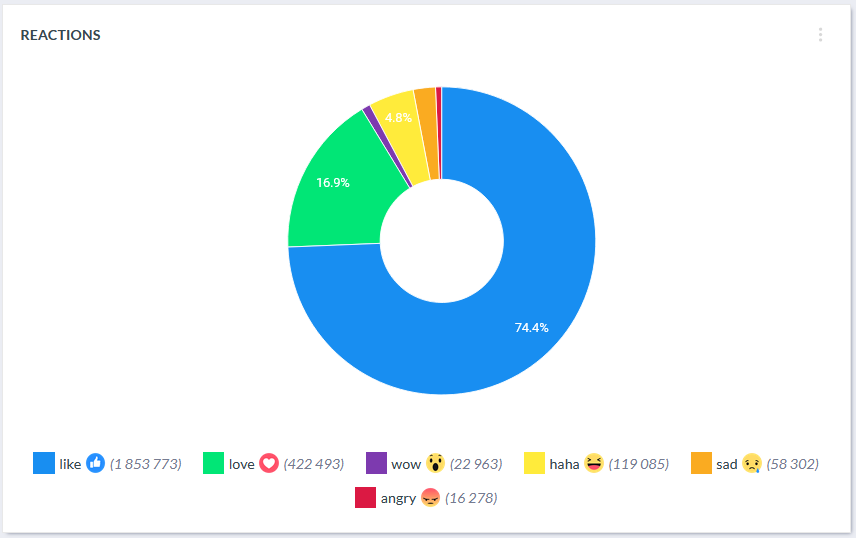
For a Facebook watch, you have access to a pie chart of reactions. It helps you to evaluate the ton of your subject.
{% hint style="info" %}
You have the possibility to export each elements on Visibrain in JPEG or CSV. You can also add them to smartboards.
{% endhint %}
### b. Don't miss anything about your industry
#### ➡️ POSTS and ARTICLES section
Here you will find all posts and articles related to your industry posted within your period of analysis. You can sort them by different indicators (date, likes, interactions...). You can add filter to focus on a specific event.
### c. Detection of key influencers
#### ➡️ USERS section
You can detect the most relevant influencers by adding filters based on their number of followers, details of their biography description, language, etc. \
This feature is available on all the units except on Facebook.
## 💌 Information sharing
### a. By mail, Slack or Telegram
You can set up different kinf of [*Alerts*](/~/revisions/6nhD4RHJZhMeRHBm3X6z/platform/alerts.md) *:*
🔔 An *Abnormal Activity* alert, to keep an eye on important news
📰 An automatic *Report* with key influencers' activity
📰 An automatic *Report* on posts and articles getting the most impact
### b. In a smartboard
[*Smartboards*](/~/revisions/6nhD4RHJZhMeRHBm3X6z/platform/smartboards.md) allow you to have a view on all social media at the same time.