# Create a smartboard

<figure><img src="https://3627599965-files.gitbook.io/~/files/v0/b/gitbook-x-prod.appspot.com/o/spaces%2F-MbfxQd0NPS3HPiroBm1%2Fuploads%2F9CZrfEPf4ws04an8jQt1%2Fimage.png?alt=media&#x26;token=dc3995ab-5bbc-413b-8107-5371b2370082" alt=""><figcaption></figcaption></figure>

Click on the ***New Smartboard*** icon, and give it a title. A blank page will appear, your *Smartboard* is ready to be born.

#### <mark style="background-color:green;">There are three ways to add items to a</mark> <mark style="background-color:green;"></mark>*<mark style="background-color:green;">Smartboard</mark>*<mark style="background-color:green;">:</mark>

## 1. Add items directly from the *Explore* part

By clicking on the action button (the three dots aligned vertically) of an element in the *Explore* section, you can add you item to your Smartboard.

<figure><img src="https://3627599965-files.gitbook.io/~/files/v0/b/gitbook-x-prod.appspot.com/o/spaces%2F-MbfxQd0NPS3HPiroBm1%2Fuploads%2FhPMpCrn1xrzIdjqU4wqt%2FCapture%20d%E2%80%99e%CC%81cran%202023-02-22%20a%CC%80%2011.41.19.png?alt=media&#x26;token=0d029356-a4b9-430d-8af8-95ca2ab2d882" alt=""><figcaption></figcaption></figure>

Your item will appear at the end of your smartboard and you can move or resize it.

## 2. Add items with the + button

<figure><img src="https://3627599965-files.gitbook.io/~/files/v0/b/gitbook-x-prod.appspot.com/o/spaces%2F-MbfxQd0NPS3HPiroBm1%2Fuploads%2Fhns5M2gBCiNmtWR80nV3%2Fimage.png?alt=media&#x26;token=27684da8-ba2a-41bb-801c-baf4033eb286" alt=""><figcaption></figcaption></figure>

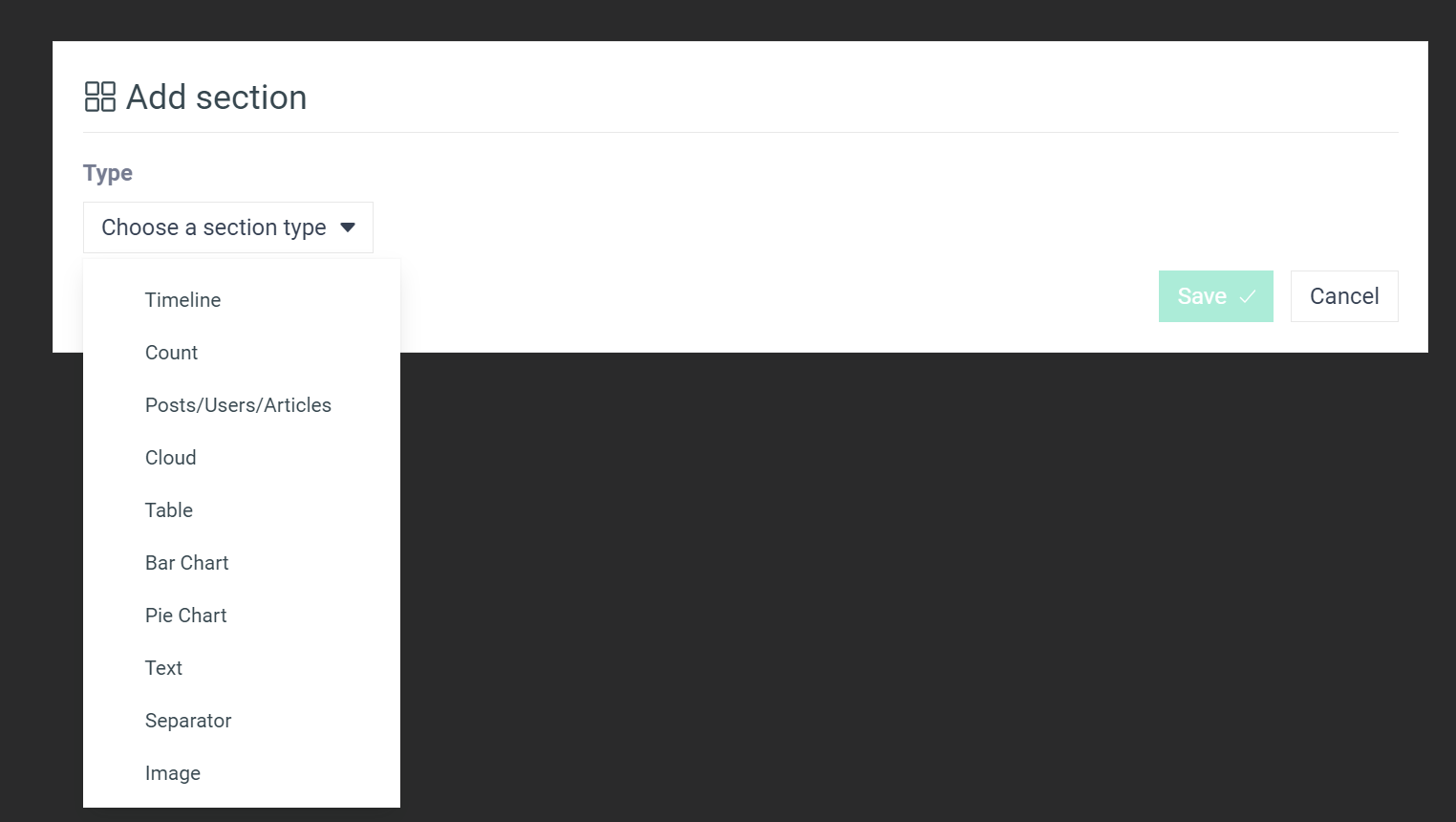
At the top right of your smartboard page, you will find the **+** button highlighted here in yellow, which will allow you to add blocks. A drop-down menu will appear, where you can choose the section you want to add.

<figure><img src="https://3627599965-files.gitbook.io/~/files/v0/b/gitbook-x-prod.appspot.com/o/spaces%2F-MbfxQd0NPS3HPiroBm1%2Fuploads%2FqmDvLsVpkKsE4WQV1DnR%2Fimage.png?alt=media&#x26;token=b337a2bb-970e-468b-a62b-5c7c3edc7632" alt=""><figcaption></figcaption></figure>

<mark style="background-color:green;">**Click on the following links to create the section of your choice.**</mark>

| <p><a href="create-a-smartboard/timeline"><mark style="color:blue;"><strong>Timeline</strong></mark></a><br>Shows the evolution of a <em>Topic</em> activity. Useful for comparing topics, competitors, or networks.</p> | ![](https://3627599965-files.gitbook.io/~/files/v0/b/gitbook-x-prod.appspot.com/o/spaces%2F-MbfxQd0NPS3HPiroBm1%2Fuploads%2FTcU7l8h9h0nEIJ7inkIu%2Fimage.png?alt=media\&token=90f78f93-1ea0-4820-a697-02b1580724c5) |
| ------------------------------------------------------------------------------------------------------------------------------------------------------------------------------------------------------------------------ | ------------------------------------------------------------------------------------------------------------------------------------------------------------------------------------------------------------------- |
| <p><a href="create-a-smartboard/count"><mark style="color:blue;"><strong>Count</strong></mark></a><br>Quantitative datas about your <em>Topic</em>.</p>                                                                  | ![](https://3627599965-files.gitbook.io/~/files/v0/b/gitbook-x-prod.appspot.com/o/spaces%2F-MbfxQd0NPS3HPiroBm1%2Fuploads%2FbEWmUtG1wRrsSYo5BtD5%2Fimage.png?alt=media\&token=58e74a1e-9535-41c8-b384-dd8cae784988) |
| <p><a href="create-a-smartboard/posts-articles-users"><mark style="color:blue;"><strong>Posts/Users/Articles</strong></mark></a><br>Review of posts, users or articles.</p>                                              | ![](https://3627599965-files.gitbook.io/~/files/v0/b/gitbook-x-prod.appspot.com/o/spaces%2F-MbfxQd0NPS3HPiroBm1%2Fuploads%2FRjcbLxK1BsrWzhskm416%2Fimage.png?alt=media\&token=6decb538-4c63-4bed-8ee4-52e36eeaaeef) |
| <p><a href="create-a-smartboard/cloud"><mark style="color:blue;"><strong>Cloud</strong></mark></a><br>The word cloud highlights what is the most discussed within your <em>Topic</em> .</p>                              | ![](https://3627599965-files.gitbook.io/~/files/v0/b/gitbook-x-prod.appspot.com/o/spaces%2F-MbfxQd0NPS3HPiroBm1%2Fuploads%2FDg5C3zxyDio4SvFU4FR9%2Fimage.png?alt=media\&token=af6b53a3-a8da-49a4-a96c-e3a00d331731) |
| <p><a href="create-a-smartboard/table"><mark style="color:blue;"><strong>Table</strong></mark></a><br>The table allows you to get a more detailed view of hashtags, expressions, countries etc.</p>                      | ![](https://3627599965-files.gitbook.io/~/files/v0/b/gitbook-x-prod.appspot.com/o/spaces%2F-MbfxQd0NPS3HPiroBm1%2Fuploads%2FnHYG7VRTvlxflxQHQ2tU%2Fimage.png?alt=media\&token=c97381f8-523b-43c6-aa3c-6d348db9a414) |
| <p><a href="create-a-smartboard/bar-chart"><mark style="color:blue;"><strong>Bar chart</strong></mark></a><br>The bar chart is used to make comparisons between topics, sub-topics and/or social networks.</p>           | ![](https://3627599965-files.gitbook.io/~/files/v0/b/gitbook-x-prod.appspot.com/o/spaces%2F-MbfxQd0NPS3HPiroBm1%2Fuploads%2FeplGhzsXKdg3Ku0kHbRq%2Fimage.png?alt=media\&token=a8814d3c-4fde-4b58-b05c-c7438f75693e) |
| <p><a href="create-a-smartboard/pie-chart"><mark style="color:blue;"><strong>Pie chart</strong></mark></a><br>The pie chart is an automatic graph giving you a share of voice.</p>                                       | ![](https://3627599965-files.gitbook.io/~/files/v0/b/gitbook-x-prod.appspot.com/o/spaces%2F-MbfxQd0NPS3HPiroBm1%2Fuploads%2FAqQX0dl9q3t3pl3ER6iK%2Fimage.png?alt=media\&token=2bd54950-9f58-4eba-9a8b-6c2f4740c935) |
| <p><a href="create-a-smartboard/text"><mark style="color:blue;"><strong>Text</strong></mark></a></p><p>Used to add comments, analysis, titles etc.</p>                                                                   | ![](https://3627599965-files.gitbook.io/~/files/v0/b/gitbook-x-prod.appspot.com/o/spaces%2F-MbfxQd0NPS3HPiroBm1%2Fuploads%2FMkasmB98EysnGfRFAZql%2Fimage.png?alt=media\&token=f8d6ea5e-81e8-400e-ace3-2cb8a93abd22) |
| <p><a href="create-a-smartboard/separator"><mark style="color:blue;"><strong>Separator</strong></mark></a><br>Used to organize your smartboard with titles.</p>                                                          | ![](https://3627599965-files.gitbook.io/~/files/v0/b/gitbook-x-prod.appspot.com/o/spaces%2F-MbfxQd0NPS3HPiroBm1%2Fuploads%2F6z7QkYnm4HInl7NENEHM%2Fimage.png?alt=media\&token=7c0f6b00-d8ae-45ac-9514-04ed0e0e7348) |
| <p><a href="create-a-smartboard/image"><mark style="color:blue;"><strong>Image</strong></mark></a><br>Images or logos can be added to your smartboard.</p>                                                               | ![](https://3627599965-files.gitbook.io/~/files/v0/b/gitbook-x-prod.appspot.com/o/spaces%2F-MbfxQd0NPS3HPiroBm1%2Fuploads%2F8QDhgtFlPUjtYnBPveSo%2Fimage.png?alt=media\&token=a44cea4c-a61e-4e4d-b98c-37e8a4aa17c7) |

## 3. Clone an existing smartboard.

<figure><img src="https://3627599965-files.gitbook.io/~/files/v0/b/gitbook-x-prod.appspot.com/o/spaces%2F-MbfxQd0NPS3HPiroBm1%2Fuploads%2FZTo96XFihGeYqaFDPMNM%2Fimage.png?alt=media&#x26;token=ed3efeed-8bf4-40f7-9432-5186451eda21" alt=""><figcaption></figcaption></figure>

It is possible to **clone a smartboard** from the page gathering all the *Smartboards*, by clicking on the action button (three vertically aligned dots) and then on *clone*. Then, you can modify the associated topics in each block to adapt it to another subject. (See section [Modify a smartboard](https://help.visibrain.com/~/revisions/Sg0jEnRI9hg61KE4OFRP/platform/smartboards/edit-a-smartboard)).