> For the complete documentation index, see [llms.txt](https://help.visibrain.com/llms.txt). Markdown versions of documentation pages are available by appending `.md` to page URLs; this page is available as [Markdown](https://help.visibrain.com/platform-guide/reports/telegram.md).
# Telegram
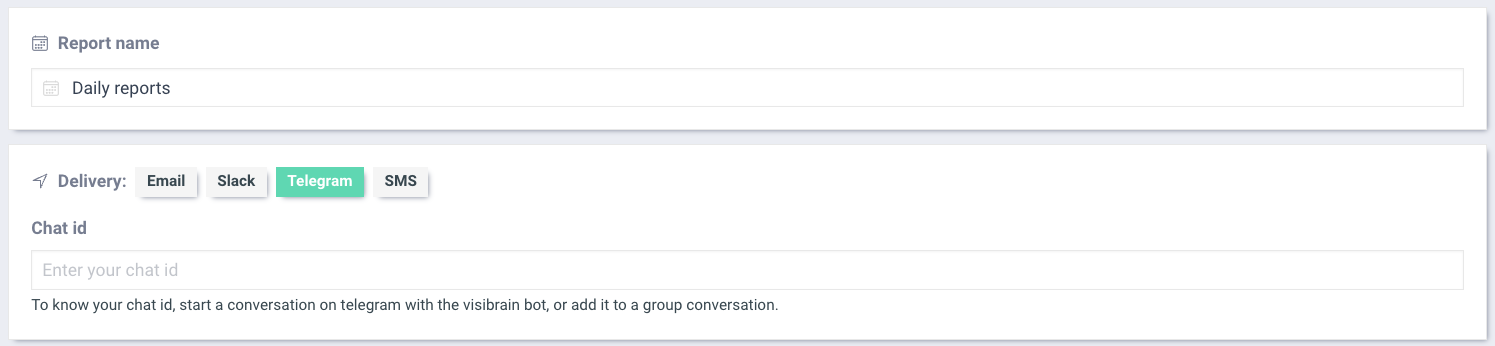
To receive your Reports on your Telegram App, just click on the Telegram Tab
**On a 1 to 1 conversation**
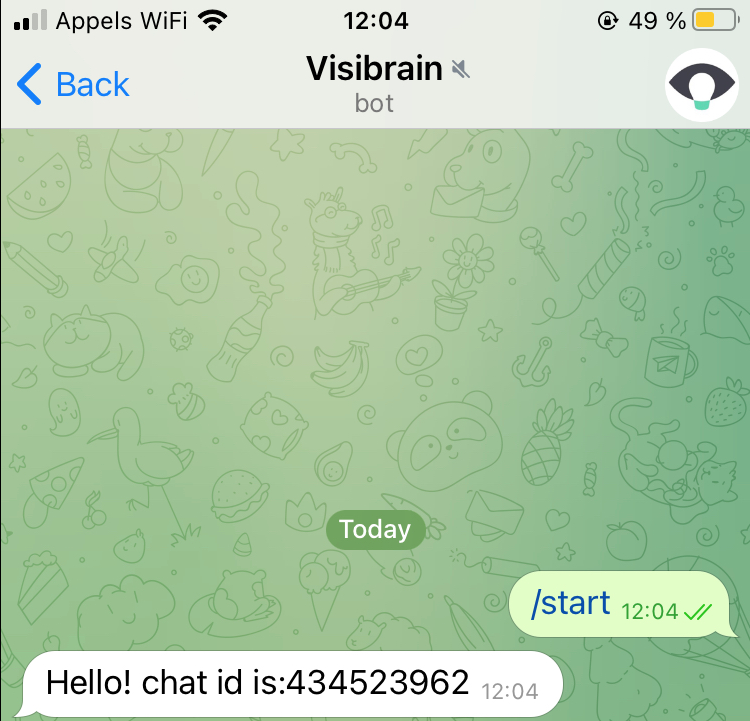
To receive your Reports on Telegram, start a conversation with the Telegram Visibrain Bot. \
Click on "New Chat" on Telegram:
Search for Visibrain Bot, when you see it appear, start a chat with the bot.
Type /start and send your first message. The bot will automatically answer back with a Chat ID with 9 digits.
Copy and Paste this Chat ID to your Reports Page. \
You will receive your Reports in this private conversation.
{% hint style="info" %}
If you want to receive other Reports or Alerts on this Chat, just use the same Chat ID in other Alerts or Reports settings.
{% endhint %}
**In a channel or group chat**
You can program Reports to a specific Telegram Group Chat, you just need to add the Telegram Visibrain Bot to you group chat. \
To get the group Chat ID, send /start to the chat and VisiBot will send automatically the right Chat ID composed of 9 digits.
Copy and Paste this Chat ID to your Reports Page. \
You will receive your Reports in this group chat.
{% hint style="success" %}
The main difference between these two Chat IDs is the hyphen symbol before the Group Chat ID, don't forget to include when setting up your Telegram Report.
{% endhint %}
{% hint style="warning" %}
We do not recommend using Telegram for Reports, the format is not ideal.
{% endhint %}